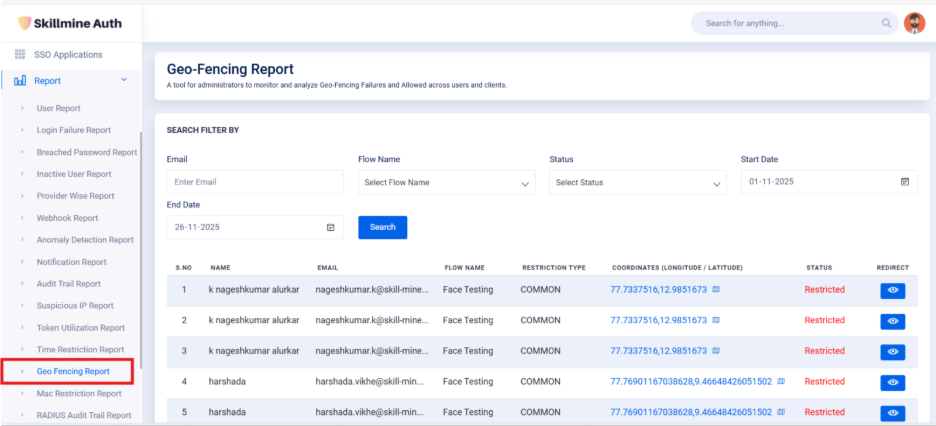
Geo-Fencing Restriction Report
Geo Fencing Restriction
The administrators to monitor and analyze geo-fencing login attempts, highlighting both allowed and restricted events based on defined geographic boundaries. This report helps identify location-based access violations and ensures compliance with geolocation security policies.
Search Filter By
Email: Search for geo-fencing login attempts using the user’s email address.
Flow Name: Filter results by selecting the authentication flow used during the login attempt.
Status: Allows you to filter Allowed or Restricted geo-fencing events.
Start Date: Select the beginning date to include login attempts from this date onward.
End Date: Select the ending date to include login attempts up to this date.
Search Button: Applies the selected filters and displays matching geo-fencing activity records.

This Table will show the details of the geo-fencing login.
S. No
Displays the serial number for each geo-fencing event.
Name
Shows the name of the user associated with the login attempt.
Displays the user’s email address.
Flow Name
Indicates the authentication flow the user attempted to log in with.
Restriction Type
Shows whether the geo-fencing restriction is COMMON or USER and GROUP specific.
Coordinates (Longitude / Latitude)
Displays the exact location (longitude & latitude) from where the login attempt was made.
Status
Shows whether the login attempt was Allowed or Restricted based on geo-fencing rules.
Redirect
Allows admins to view detailed information about the specific geo-fencing event in Geo Fencing Restriction Page.
Last updated