
Login Failure Report

Login Failure Report

The login failure Report Chronicles instances of failed login attempts, offering insights into user interaction patterns and potential automated threats. This report aids in assessing the effectiveness of login security measures and identifying areas for enhanced protection.

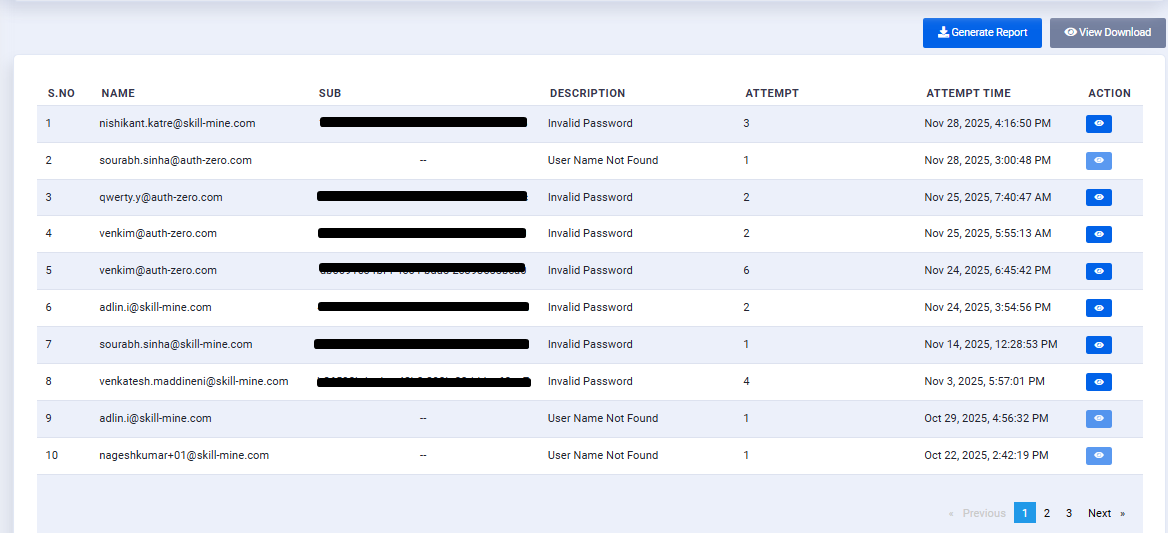
This Table will show the details of the login failure.

Name: Users Name.

Email/Phone-no: This column will show the either email or phone no of the user.

Last Logged in Time: This will show the date and time of the user when they lastly logged in.

Action: The action will directly take you to the particular user profile.

Generate Report:

  • The admin clicks on the Generate Report button.

  • The system processes and compiles the list of users who haven’t logged in within the defined inactivity threshold.

  • Once the report generation is completed:

Note: The admin receives an email notification confirming that the report is ready for download.

View Download:

  • The admin clicks on the View Download button to view all generated report logs.

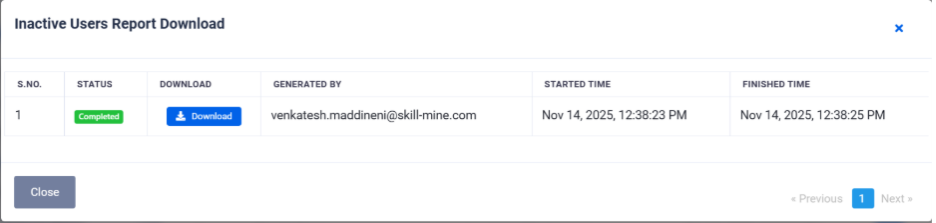
  • A Report Download Table is displayed with the following fields:

S. No:

Report sequence number

Status:

Indicates report generation status (e.g., Completed, In Progress, Failed)

Download:

Provides a download link (once the report is ready)

Generated By:

Displays the email of the admin who triggered report generation

Started Time:

Time when the report generation was initiated

Finished Time:

Time when the report was successfully completed

Download Report

  • When the report status shows Completed, the admin clicks Download to retrieve the generated file.

  • The downloaded report contains inactive user details, which can be used for analytics, communication, or cleanup activities.

Last updated