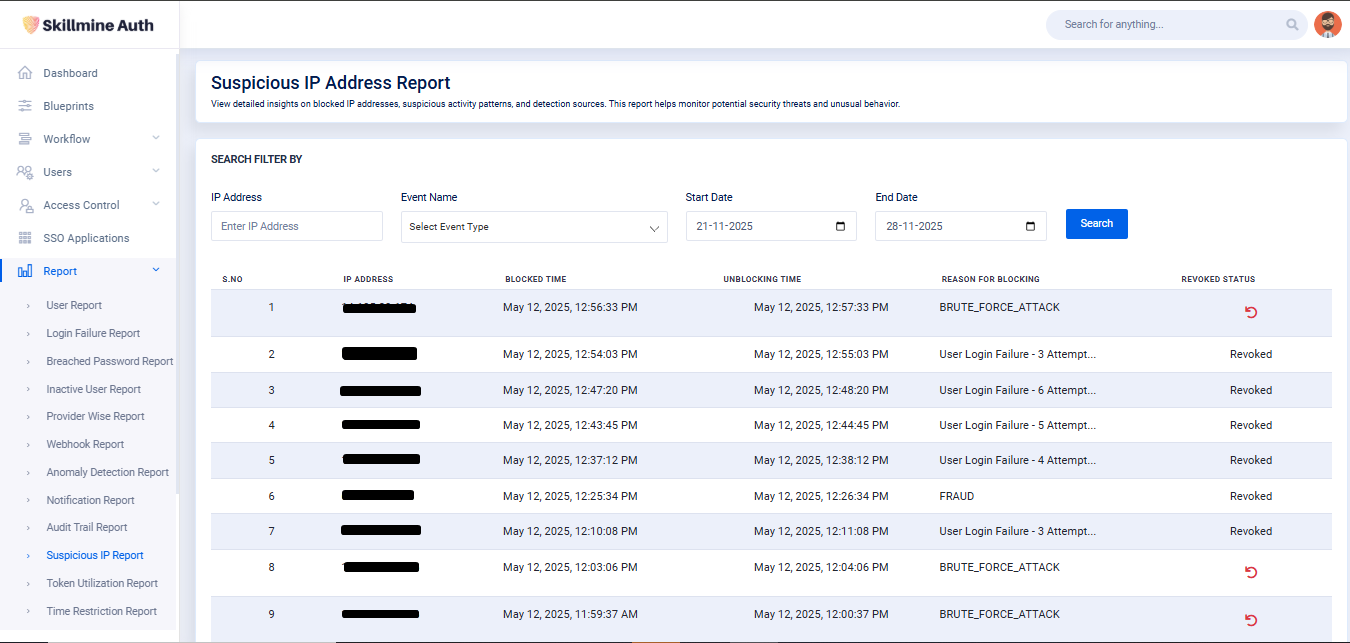
Suspecious IP Report

Suspecious Report

The Suspicious IP Address Report provides insights into IP addresses flagged for unusual or potentially harmful activity. It highlights blocked IPs, the reasons behind their blocking, and their unblocking details. This report helps identify security threats, detect malicious login attempts, and support proactive risk mitigation.

  • IP Address: Enter a specific IP address to search for related blocking or suspicious activity records.

  • Event Name: Select the type of event (e.g., brute force, failed login attempts) to filter the results.

  • Start Date: Choose the starting date to display records detected on or after this date.

  • End Date: Choose the ending date to show records detected on or before this date.

  • Search Button: Applies the selected filters and displays the matching IP activity records.

This Table will show the details of the Suspecious Report

S. No

Displays the serial number of each record.

IP Address

Shows the IP address identified as suspicious or blocked.

Blocked Time

Indicates the exact date and time when the IP address was blocked.

Unblocking Time

Shows when the IP was automatically or manually unblocked.

Reason for Blocking

Provides the reason behind blocking (e.g., brute force attack, repeated failed logins).

Revoked Status

Displays whether the block has been revoked; allows administrators to revoke the block manually.

Last updated