# MAC Restriction Report

#### Mac Restriction report&#x20;

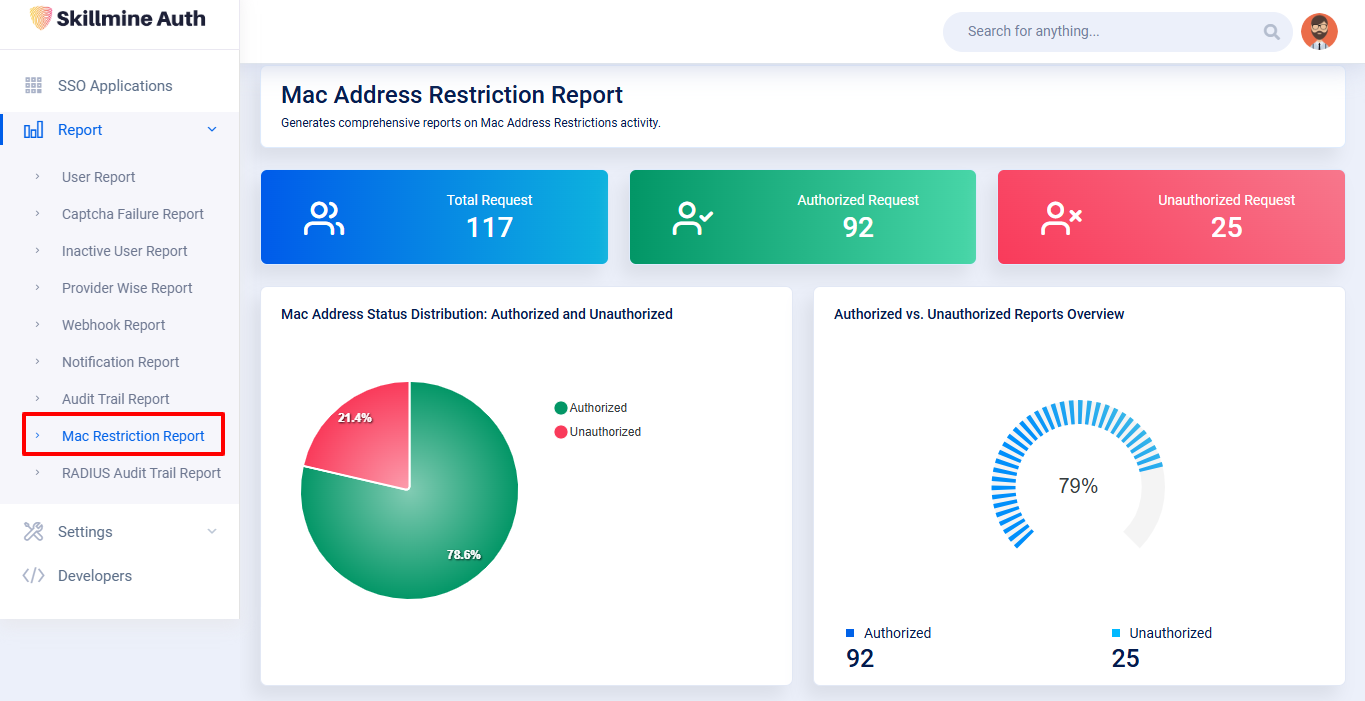
The Mac Address Restriction Report provides detailed insights into authorized and unauthorized MAC address activities. It helps administrators track device-level access, monitor restriction events, and identify potential security risks associated with unauthorized devices.&#x20;

***Chart Descriptions:***&#x20;

**1. Chart** (Top Section) \
The first chart section displays the overall MAC address activity count, including:&#x20;

* **Total Request:** The total number of MAC address restriction events recorded.&#x20;
* **Authorized Request:** Number of events where the MAC address was recognized and allowed.&#x20;
* **Unauthorized Request:** Number of events where the MAC address was unrecognized or blocked.&#x20;

**2. Status Distribution Charts** (Second Section) \
The second chart section provides a visual breakdown of MAC address activity:&#x20;

* **Mac Address Status Distribution:** Shows the percentage of Authorized vs Unauthorized events.&#x20;
* **Authorized vs Unauthorized Reports Overview:** Highlights the proportion of authorized events compared to unauthorized ones for quick security assessment.&#x20;

<figure><img src="/files/R92ugV1K8dUfjQD4EMdc" alt=""><figcaption></figcaption></figure>

&#x20;

<figure><img src="/files/JjXyIX7AoFxx6FpqdBps" alt=""><figcaption></figcaption></figure>

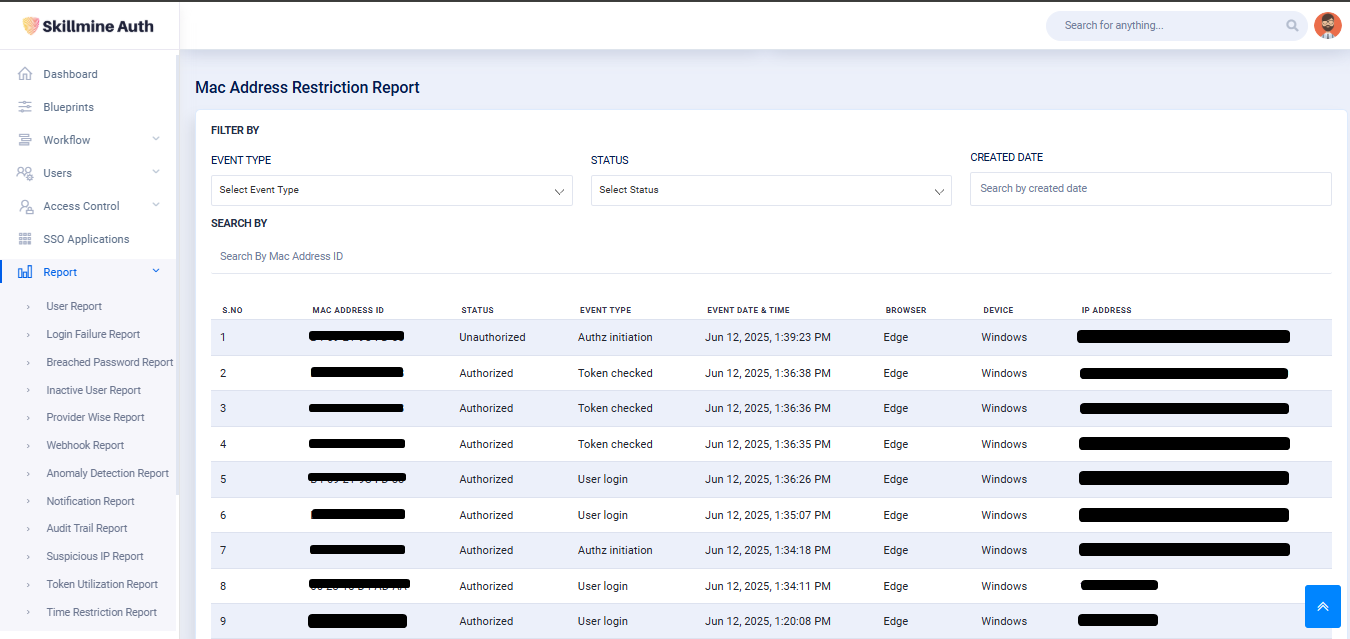
**Event Type:** Allows filtering based on the type of MAC event (e.g., Authz initiation, MFA verification list).

**Status:** Filters results by Authorized or Unauthorized events.

**Search By MAC Address ID:** Search for events related to a specific MAC address.

**Created Date:** Filters MAC events based on the date they were created.

This Table will show the details of the MAC Address Restriction&#x20;

<table data-header-hidden><thead><tr><th width="165.66668701171875"></th><th></th></tr></thead><tbody><tr><td>S. No </td><td>Serial number for each MAC restriction record. </td></tr><tr><td>Mac Address ID </td><td>The MAC address was involved in the event. </td></tr><tr><td>Status </td><td>Indicates whether the MAC address was Authorized or Unauthorized. </td></tr><tr><td>Event Type </td><td>The type of activity or trigger that generated the record. </td></tr><tr><td>Event Date &#x26; Time </td><td>Timestamp showing when the MAC address event occurred. </td></tr><tr><td>Browser </td><td>Browser used during the access attempt. </td></tr><tr><td>Device </td><td>Device type associated with the MAC address (e.g., Windows, macOS). </td></tr><tr><td>IP Address </td><td>IP address from which the MAC-related activity was detected. </td></tr></tbody></table>


---

# Agent Instructions: Querying This Documentation

If you need additional information that is not directly available in this page, you can query the documentation dynamically by asking a question.

Perform an HTTP GET request on the current page URL with the `ask` query parameter:

```
GET https://authdocs.skill-mine.com/licentio-documentation/report/mac-restriction-report.md?ask=<question>
```

The question should be specific, self-contained, and written in natural language.
The response will contain a direct answer to the question and relevant excerpts and sources from the documentation.

Use this mechanism when the answer is not explicitly present in the current page, you need clarification or additional context, or you want to retrieve related documentation sections.
