> For the complete documentation index, see [llms.txt](https://authdocs.skill-mine.com/licentio-documentation/llms.txt). Markdown versions of documentation pages are available by appending `.md` to page URLs; this page is available as [Markdown](https://authdocs.skill-mine.com/licentio-documentation/settings/mac-address-restrictions.md).
# MAC Address Restrictions
#### MAC Address Restrictions
The **MAC Address Restrictions** page in *Skillmine Auth* allows administrators to define, organize, and control access to the system based on **device MAC addresses**.\
This ensures that only registered or authorized devices can connect, adding an additional layer of security and control to your authentication environment.
After implementing MAC Address Restrictions, **Skillmine Auth Browser becomes mandatory** for users to access applications.\
This enforcement ensures that users can only access the application through the **Skillmine Auth Browser**, thereby preventing access from standard or unapproved browsers.\
By doing so, administrators can maintain a **secure and controlled access path** that aligns with organizational security policies.
Administrators can create groups of MAC addresses, associate them with specific teams or use cases, and manage their access permissions centrally.
This page is used to:
* Create and manage MAC Address Groups for logical collections of devices categorized by teams, departments, or functions.
* Add, view, and edit MAC addresses within each group.
* Restrict or allow access based on specific devices to strengthen endpoint-level security.
By enforcing MAC-based restrictions, organizations can prevent unauthorized hardware from accessing sensitive resources or networks.
#### *Configuration*
***Step 1:*** Create a MAC Address Group
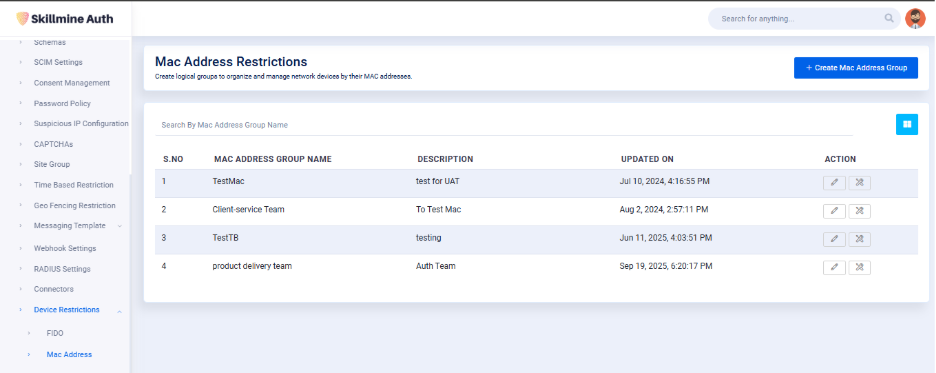
1. Navigate to **Settings → Device Restrictions → MAC Address**.
2. Click **+ Create Mac Address Group**.
3. Enter the following details:
1. **MAC Address Group Name:** A descriptive name for the group .
2. **Description:** Optional details to explain the purpose of the group.
4. Click **Save** to create the group.
Once created, the group will appear in the list along with its description, creation date, and available actions.
***Step 2:*** Add MAC Addresses to the Group
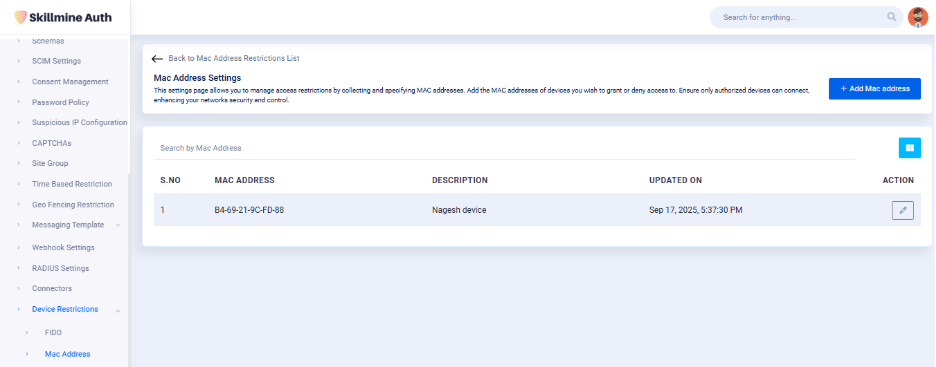
1. From the MAC Address Group List, click the **Edit icon** next to a group name to open its settings.
2. Click **+ Add MAC Address** to add new devices.
3. Enter the following details:
1. **MAC Address:** The physical MAC address of the device you want to allow or restrict.
2. **Description:** Optional notes about the device.
4. Click **Save** to include the device in the group.
You can edit or remove MAC entries at any time using the corresponding icons under the **Action** column.
#### *Conclusion*
The MAC Address Restrictions feature in Skillmine Auth provides administrators with the tools to manage access control at the device level. \
By grouping and registering MAC addresses, administrators can control which devices are permitted to connect, monitor updates, and maintain compliance with security policies.
It’s an essential configuration page for enhancing network-level security, ensuring that only trusted hardware can interact with your authentication environment.
**Note:** Once the MAC Address Restriction policy is enforced, users attempting to log in from **unregistered devices** or **non-Skillmine browsers** will be restricted from accessing the application.\
It is recommended that all authorized users install and use the **Skillmine Auth Browser** to ensure uninterrupted and compliant access.